
Da Fit
MO YOUNG LIMITEDSports
3.611.78K Reviews
- Version
- 2.9.25-97-gf8b4dff77d
- Installs
- 100.00M
- Age Rating
- Everyone
Screenshots
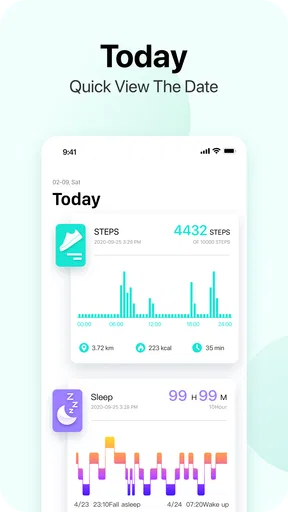
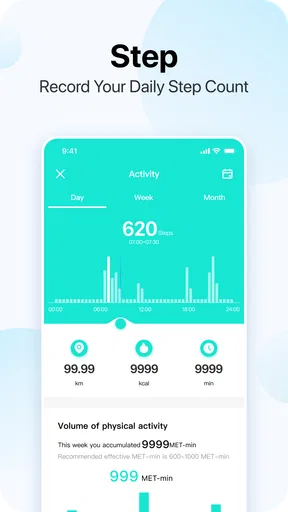
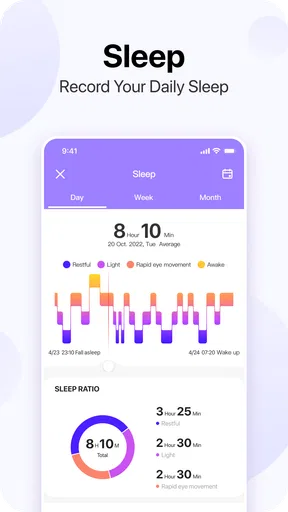
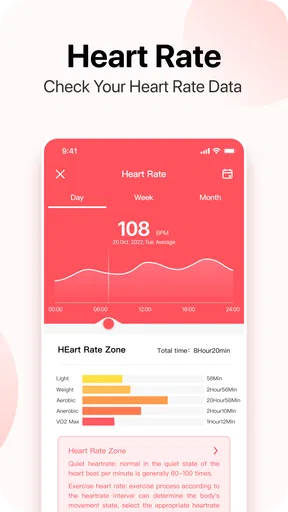
Our Review of Da Fit
 Analysis by Appyee
I usually open a health app with a simple question in mind: what can I realistically learn from my day without turning fitness tracking into another chore? Da Fit is aimed at people who pair a wearable with a phone and want one place to check activity and health information. It is a free sports app from MO YOUNG LTD, rated for Everyone, and it has a 3.8 average from around 365,000 ratings, with over 50 million installs. Those figures suggest a broad audience, but the more useful question is whether its everyday flow suits your habits.
Start with the wearable, not the charts
Da Fit is most useful when you already have a compatible band or watch and want to see its readings on your phone. Before relying on any dashboard, I would first check that the wearable is paired and that new readings are syncing. A blank or stale screen is easy to misread as a tracking problem when the actual snag may be the connection between the two devices.
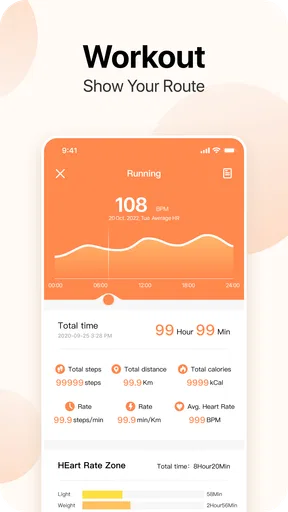
Once the connection is working, the app brings common activity information together: steps, calories, distance, heart rate, sleep, and sports modes. That combination makes it easier to glance at several parts of a routine without switching between separate tools. It is not a substitute for a clinician’s assessment, though; I treat wearable readings as personal tracking signals, not medical conclusions.
Follow a day from movement to review
A practical way to use Da Fit is to let the wearable gather information while you go about your day, then check the phone when you have a reason to act on it. For example, I might look at steps after lunch, notice that I have been sitting for a long stretch, and use a reminder or a short walk to reset the afternoon. Later, I can review the day’s activity rather than trying to remember every walk or errand from memory.
This kind of routine works best when I choose one or two things to pay attention to. Checking every number repeatedly can make normal fluctuations feel more important than they are. A weekly habit of noticing patterns—such as whether workdays involve less movement than weekends—is more useful than treating a single day’s total as a verdict.
A Comprehensive Fitness Companion
The first thing that caught my eye with Da Fit is how it seamlessly integrates multiple health monitoring features into one app. Right off the bat, you’ve got your basics covered: steps, calories, and distance. But it doesn’t stop there. It even tracks your heart rate, sleep quality, and offers a range of sports modes. It’s like having a personal trainer in your pocket.
Interface and Usability
The interface is clean and intuitive. Whether you’re a tech newbie or a seasoned app user, navigating through Da Fit is a breeze. The main dashboard gives you a clear snapshot of your daily metrics, and with just a few taps, you can dive deeper into any specific area you want to explore. I found the dashboard layout particularly user-friendly and, dare I say, kind of addictive to check throughout the day.
Features That Stand Out
What sets Da Fit apart are the detailed insights it provides. For instance, the sleep analysis doesn’t just tell you how long you slept; it breaks down your sleep stages, helping you understand your rest patterns better. The heart rate monitor is pretty nifty too. It gives real-time data, which is super handy during workouts. I also appreciated the synchronization with my smartwatch, making data transfer effortless.
Customizable Alerts and Goals
Another feature I loved is the ability to set personalized goals and reminders. Whether it’s a gentle nudge to drink water or a reminder to get up and move after sitting too long, Da Fit has got you covered. It’s like the app knows me better than I know myself sometimes.
Make the readings useful, not distracting
Goals and reminders work best when they fit the day you actually have. I’d start with a modest activity target and adjust it after seeing how it behaves across ordinary weekdays, rather than setting an ambitious number on day one. If a reminder arrives during a meeting or commute, it may not be actionable; the helpful test is whether it nudges a small change at a time when you can respond.
There is also a useful trade-off in how much attention you give the health panels. Heart-rate readings during a workout can add context to how effort feels, but a single reading should not be treated as a full account of fitness. Sleep-stage estimates can be interesting for spotting broad routine changes, yet I would not let one unusual night dictate a major change to my schedule. The app is better as a log for reflection than as an authority that decides what your body needs.
The handoff between app and wearable
The phone is where I would review trends and adjust the routine; the wearable is the part that makes tracking convenient while I am away from the screen. That division matters. If the watch or band is not syncing, checking the app over and over does not create new information. I would confirm the connection, allow the wearable time to pass along its readings, and then judge the day from the updated record.
Device fit can affect the experience too. The app’s readings and available controls depend in part on the wearable paired with it, so I would not assume every band presents identical screens or behaves in exactly the same way. If you are choosing a wearable specifically for a feature, check that the model supports it before making Da Fit the deciding factor. A companion app can only make good use of what its paired device supplies.
Compatibility and Connectivity
Da Fit is compatible with both Android and iOS, which is a huge plus in my book. The connectivity with wearables is smooth, and syncing data is quick and painless. It’s nice to see an app that doesn’t discriminate based on your device preference!
One thing to note, though, is that while the app itself is fantastic, the experience can vary slightly depending on the smartwatch brand you pair it with. But, in most cases, it’s pretty consistent and reliable.
Who will get the most from it?
I think Da Fit makes the most sense for someone who wants a straightforward companion to a compatible wearable: a person who likes seeing daily movement, checking sleep patterns, and using a few reminders without building a complicated training system. It can also suit someone beginning to pay attention to activity, because the dashboard gives familiar measures a clear place to start. The important part is to use it as a prompt for manageable habits, not as a demand to optimize every hour.
It is less suited to an athlete who needs deep training analysis, carefully structured plans, or a detailed record tailored to a particular sport. In that situation, a specialist training platform may offer a better fit, especially if you need robust workout planning and comparisons over time. Likewise, if you do not own a compatible wearable, the app’s main appeal is reduced: it is designed around pairing and tracking, rather than replacing a dedicated phone-based workout or health service.
How it compares with other tracking choices
Compared with using a watch’s built-in screen alone, a companion app such as Da Fit gives you a phone-based place to look over activity and sleep information. Compared with a broad health platform, its appeal is more tied to the wearable you pair with it. That can keep the routine simple, but it also means the experience is not as independent of hardware as a stand-alone exercise log.
I would choose a more specialized alternative if my main goal were coached running, detailed performance analysis, or a carefully planned strength program. For everyday movement and a general view of activity, sleep, and heart-rate readings, Da Fit is a more approachable option. Its value depends less on collecting every possible metric and more on whether the basic information helps you make a small, repeatable change.
Where the routine can break down
The main friction is the reliance on the paired wearable. If syncing becomes inconsistent or the device’s feature set does not match what you expected, the app may feel limited even when its screens are easy to use. I would troubleshoot the pairing before drawing conclusions from missing or delayed readings, and I would avoid comparing numbers from different devices as if they were guaranteed to be identical.
Another limitation is the temptation to overinterpret estimates. Step counts, sleep summaries, and heart-rate readings are useful for context, but they can be affected by how and when a wearable records them. If a number looks surprising, I would look for a repeated pattern and consider how I felt, rather than changing my routine on the strength of one result. For health concerns, professional advice matters more than an app’s chart.
Da Fit is free, and its current version is V2.9.4-139-g7e5765f02c, with Android support starting at version 5.0. It has been available since December 14, 2017, and its broad reach makes it a familiar option in the wearable-companion space. I would still make the decision based on your device and goals rather than popularity: a simple activity companion is a different need from a dedicated coaching tool.
Final Thoughts
In a world filled with countless fitness apps, Da Fit manages to stand out by offering a comprehensive, user-friendly experience. It’s perfect for anyone looking to keep all their health data in one place without the hassle of switching between apps. If you’re on the hunt for a multifunctional fitness companion, give Da Fit a try. It might just be the app you didn’t know you needed.
My recommendation is to begin with one clear use: perhaps checking whether you move enough during a typical workday, or noticing whether your bedtime routine is consistent. Give the wearable and app time to establish a useful pattern, then keep only the reminders and readings that genuinely help. If that light-touch approach sounds right, Da Fit is worth considering; if you need precision coaching or a particular advanced training workflow, I would look elsewhere.
Privacy and Permissions
See what permissions an app requests and how it handles your data.
- Device & app history
- retrieve running apps, read sensitive log data
- Calendar
- read calendar events plus confidential information, add or modify calendar events and send email to guests without owners' knowledge
- Contacts
- read your contacts
- Location
- approximate location (network-based), precise location (GPS and network-based), access extra location provider commands
- SMS
- read your text messages (SMS or MMS), send SMS messages
- Phone
- directly call phone numbers, read call log, read phone status and identity
- Photos/Media/Files
- read the contents of your USB storage, modify or delete the contents of your USB storage
- Storage
- read the contents of your USB storage, modify or delete the contents of your USB storage
- Camera
- take pictures and videos
- Microphone
- record audio
- Wi-Fi connection information
- view Wi-Fi connections
- Device ID & call information
- read phone status and identity
- Other
- view network connections, pair with Bluetooth devices, access Bluetooth settings, send sticky broadcast, connect and disconnect from Wi-Fi, control flashlight, full network access, change your audio settings, control vibration, prevent device from sleeping
Verdict
Strengths of Da Fit
- User-friendly interface enhances navigation.
- Extensive watch face customization options.
- Accurate fitness tracking and heart rate monitor.
- Seamless Bluetooth connectivity with devices.
- Compatible with multiple smartwatch brands.
Limitations of Da Fit
- Limited third-party app integration.
- Inconsistent notifications and alerts.
- Occasional syncing delays with phone.
- Battery consumption can be high.
- Lacks advanced fitness metrics.
Similar Picks in This Category
View All
BeSoccer: Soccer Live Score
BeSoccer apps4.3

Cricbuzz - Live Cricket Scores
Cricbuzz.com3.7

NFL
NFL Enterprises LLC2.4

ESPN
Disney4.5

LiveScore: Live Sports Scores
LiveScore Limited4.5

You May Also Like
View All

Frequently Asked Questions
What features does the Da Fit app offer?
The Da Fit app provides a comprehensive suite of features designed to enhance your fitness journey. It offers activity tracking, sleep monitoring, heart rate measurement, and customizable watch faces. Additionally, it syncs with various fitness devices to give you a holistic view of your health and wellness progress.
Is the Da Fit app compatible with all smartwatches?
Da Fit is primarily designed for use with specific smartwatch models, often those manufactured by lesser-known brands. It may not be compatible with major brand devices like Apple Watch or Samsung Galaxy Watch. Always check the app’s compatibility with your device before downloading to ensure full functionality.
How user-friendly is the Da Fit app?
The Da Fit app is generally user-friendly, featuring a clean interface that makes navigation easy for users of all tech levels. Initial setup is straightforward, and most users find the app intuitive for tracking health metrics. However, some advanced features might require a bit of exploration to master fully.
Does Da Fit require a subscription for full access?
Da Fit is free to download and use, offering a wide range of features without requiring a subscription. Some additional features or enhanced functionalities might be available through in-app purchases, but the core health and fitness tracking capabilities are accessible at no cost.
How reliable is the data accuracy in Da Fit?
While Da Fit provides valuable health insights, the accuracy of its data can vary depending on the device used. Basic metrics like step count and heart rate are generally reliable, but users should be cautious with data interpretation, especially for medical purposes. It's always best to compare with professional devices for critical health monitoring.
